Fake invoices, forged certificates and AI-made “proof” now look perfect. C2PA Content Credentials give a file a tamper-evident history, so a business can check where a file came from and what was done to it before anyone acts on it. This is how it works, what it does and does not prove, and how we would put it in front of a finance inbox or a social feed.
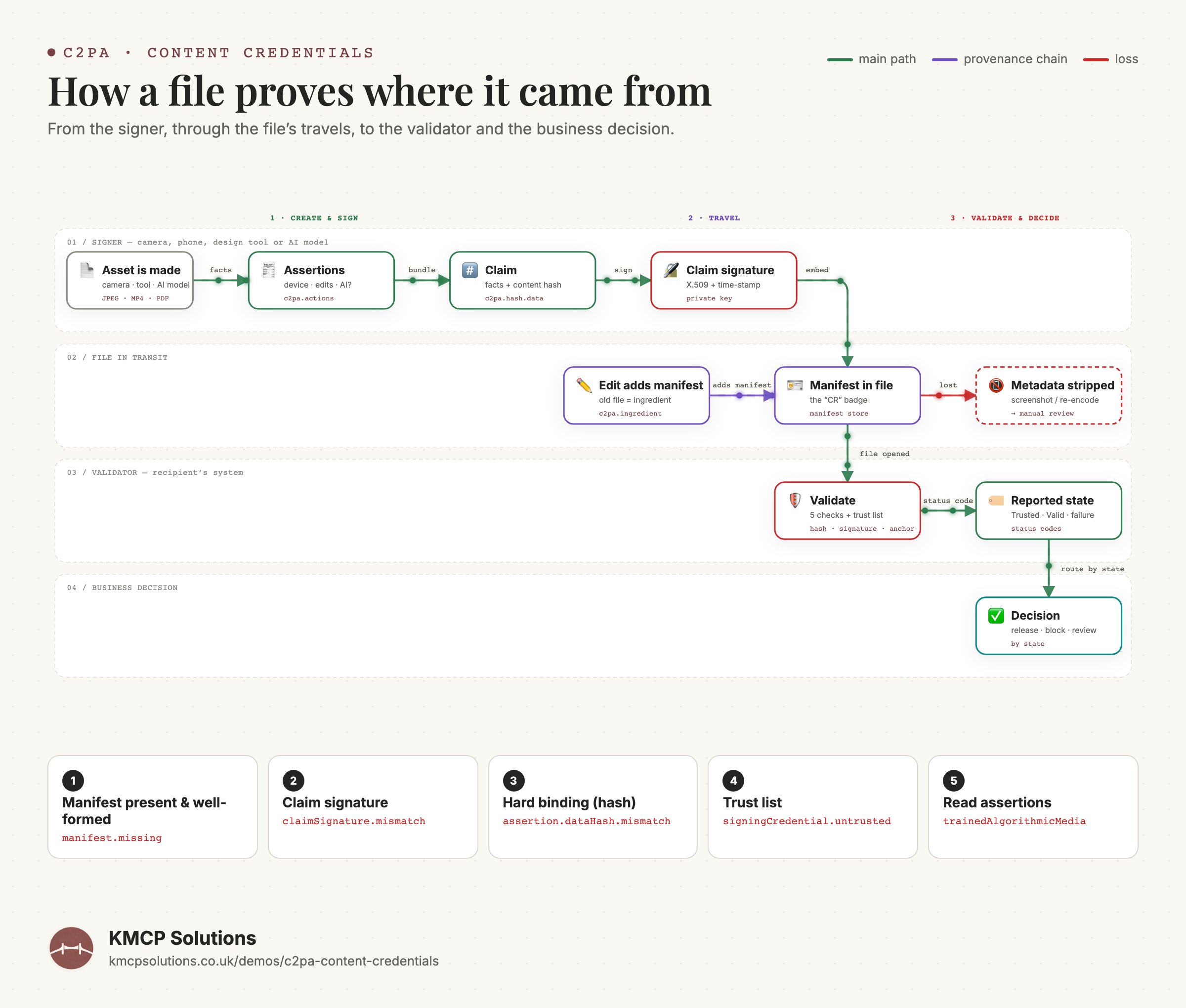
From the signer, through the file’s travels, to the validator and the business decision. Terms are the specification’s own.
The problem
Scams no longer need technical skill to pull off, or to fall for.
The people most at risk are not engineers. They are the accounts clerk, the HR officer, the client who receives a PDF and has no way to tell a genuine document from a generated one.
The supplier invoice
Same logo, same layout, new bank details. Generated in minutes, paid in seconds.
The qualification certificate
A candidate attaches a convincing degree or safety certificate. Nobody can verify the issuer from the pixels alone.
The “customer” video
A deepfake testimonial or a doctored product photo spreads on social media under your brand.
What C2PA is
A signed receipt that travels with the file.
C2PA is an open standard from the Coalition for Content Provenance and Authenticity. Its steering committee includes Adobe, Amazon, BBC, Google, Meta, Microsoft, OpenAI, Sony and TikTok.
AssertionsFacts about the file: which device or software made it, what edits were applied, whether an AI model generated it.
ClaimThose facts are bundled with a cryptographic fingerprint (a “hard binding”) of the file’s content.
SignatureThe bundle is digitally signed by the device or company that made it. Together this is a manifest, shown to people as a “Content Credential”.
ValidationAnyone can check that the fingerprint still matches, the signature is intact, and the signer is on a published trust list.
The specification covers images, video, audio, fonts and PDF 1.7 / 2.0, so invoices and certificates are in scope, not just photos. Version 2.2 (May 2025) is the one linked below; newer releases add a dedicated AI-disclosure assertion.
Interactive
Run four files through a validator.
A simulation of the checks a C2PA validator performs. Pick a file and watch each step. The outcomes mirror the states the specification defines: Well-formed, Valid, Trusted, or a failure code.
Issued and signed by the supplier’s system. Nothing changed since.
Manifest present & well-formedIs there a Content Credential, and does it follow the spec?
Claim signatureIs the signature intact and inside the certificate’s validity window?
Hard bindingDoes the file’s hash still match the one that was signed?
Trust listDoes the signer’s certificate chain to a published trust anchor?
Digital source typeWhat does the signer declare: camera capture, edit, or AI-generated?
TrustedTrustedsigningCredential.trusted
Release to accounts payable.
Read it honestly
Signed ≠ true. Missing ≠ fake.
A Content Credential answers one question well: has this exact file changed since a known party signed it? Everything else is a judgement call that stays with people.
What it proves
✓
Unchanged since signingThe content hash still matches the one inside the signed claim.
✓
Who signed itWhich key and which organisation; whether that signer sits on a public trust list.
✓
What the signer declaredCapture device, edits applied, and whether an AI model generated it.
What it does not prove
✕
That the content is trueA signed lie is still a lie. You simply know who told it.
✕
Anything about an unsigned fileMissing is not the same as fake. It means “check by hand”.
✕
Survival through screenshotsRe-encoding and screenshots strip metadata, which is why “no credentials” must route to a human.
How a business uses it
A first filter, not a final verdict.
On day one the check will not be conclusive for every file. It does not need to be. It sorts the pile so people spend attention where it matters.
1
Inbound document gate
Every PDF or image that reaches finance, HR or legal is validated on arrival and routed by its state.
Trusted→release to the person who needs it
AI-generatedTampered→block, with the reason attached
No credentials→short manual-check queue
2
Client relations
Sign what you send: quotes, invoices, reports, certificates. Your client can prove it came from you, unchanged.
You→signed PDF→Client→CR ✓ badge
Platforms such as LinkedIn and YouTube already show the badge on media that carries credentials.
3
Social content
Publish brand media with credentials, and watch mentions for media under your name that carries none, or carries an AI label.
Your post · CR ✓→verifiable by anyone
Mention · no credentials→flag for review
Mention · AI label→respond or report
Adoption is uneven today, so most inbound files will land in the “no credentials” lane at first. That lane shrinks as cameras, phones, design tools and AI generators sign by default. The point is to have the gate in place before the fakes get better.
Coming soon
We are turning this into a product.
A document gate for your inbox: invoices, certificates and media are validated the moment they arrive, routed to release, label or block, or manual review, and signed on the way out so your clients can verify what came from you. No new tools for your team to learn; it sits in front of the inbox you already use.